

Michael Knight
-
Joined
-
Last visited
Posts posted by Michael Knight
-
-
-
 2
2
-
 1
1
-
-
-
-
4
-
 15
15
-
-
-
-
-
1
-
5
-
-
Edited by Michael Knight
Livingstone is either delusional or someone is giving him bad advice. He's never going to play in the NFL, why not just stay at Texas few years make a few 100k maybe catch some passes and then go sell insurance or something. Instead he can go to Tech and be a middle manager at a tortilla facotry the rest of his life
-
1
-
3
-
-
-
-
1
-
4
-
40
-
 1
1
-
-
-
1
-
-
4 minutes ago, Blotto said: He's the top 1 coach in cfb. He's Bill Snyder hopped up on meth and crack. Its his second fucking year at IU and it don't matter. Kirby looks great because they have had the #1 recruiting class just about every year.
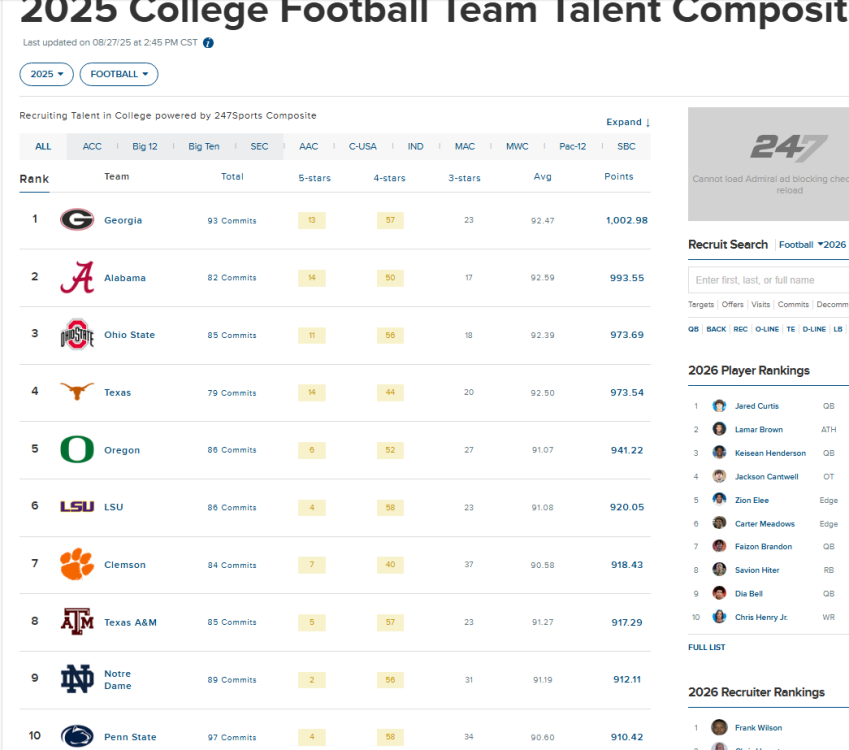
Where's IU??? Oh there they are...

Indiana got 50+ players in the portal the past 2 years
-
1
-
-
3 minutes ago, Rimbo said: How many actresses who wouldn't sleep with Weinstein became flavor-of-the-month after he went up river?
Zero point zero.
You know why?
Because the phony rumors were career-ending shit. Nobody recovered. You went out and found another career.
It probably didn't help that she wasn't a good actress and once she got older no one cast her in anything
-
-
1
-
2
-
-
-
-
1
-
2
-
 1
1
-
-
Just now, Nicole44 said: Maybe i wouldn’t if we had a Head coach that doesn’t mind coaching both sides of the ball. Not just focusing on ONE. And certainly Not whining to the press that he has to listen to the defensive headset in games. That he has to be HC not just a OC. If Cig does that I will stop praising him.
What are you his fucking agent or something?
-
1
-
-
-
maybe this site can stop rubbing its pussy over how aggy and tech both had better years than us and are passing us up in the state but i doubt it
-
2
-
-
-
3
-
-
-
-
-
-




NFL Week 18_ 2 pseudo playoff games and the NFC#1 Seed up for grabs
in Football