

Thatguy
-
Joined
-
Last visited
Posts posted by Thatguy
-
-
1 hour ago, Brisketexan said: The court had no choice. Once the prosecution dismisses the cases, it's just paperwork after that.
Which is why turning the DOJ into the "LAW FIRM WHOLLY OWNED BY DONALD TRUMP THAT DOES WHATEVER HE WANTS" is ANOTHER one of the "most disastrous things to ever happen to the United States." Seriously, I could come up with a list of 100 items that - had any "normal" president done them - would be a term and party-ending scandal. Trump's strategy of flooding the zone works. Do SO many horrible things, everything just gets overwhelmed.
It's the political strategy of your DB committing pass interference on every play knowing the refs won't call them all.
-
 1
1
-
-
-
-
 1
1
-
-
6 minutes ago, Gatorubet said: If he ever signs with FSU that would be hilarious. Rats are leaving that sinking ship. They know that only FSU’s horrid financial situation prevents them from buying out the smooth brain head coach, and there will likely be a staff change next year. They are so desperate they will probably overpay him. That and the FSU/FAMU coed talent is really the only reason to go there.
Man, spoken like a true Florida grad. Y'all hate FSU like no other.
-
4 hours ago, Zeus said: Ricky and Fernando. Two awkward motherfuckers trying to have a conversation and a weird hug. You gotta love them.
-
1
-
2
-
-
-
Edited by Thatguy
3 minutes ago, Codaxx said: The fan dream of having maulers inside is dead. Sark and Flood are going to prioritize quick feet and pass pro over drive blocking. That does fit well with outside zone. 2024 OL is probably peak Flood. You are going to get Majors and Conner and like it. I am to the point that I wish Texas would cut the run game down and specialize in outside zone. Run a lot of OZ with QB boot with Arch. Minor in couple other runs (Counter/Duo), but dont run 10 concepts. Let's not do the camp and early season flirtation with gap schemes this year.
We don't need drive blockers. Our feet weren't quick in 2024, that's why we couldn't run on Georgia, Ohio State, and ASU. Inadequate line play is why we lost to Georgia twice and got bounced in the playoffs in 24.
-
30 minutes ago, Your Mom said: Should cancel the season. We're doomed.
13 minutes ago, Steamboat1874 said: News Flash
No team in the country is getting 6 or 7 “quality” o-lineman in the portal.
Just now, TrashMaster G said: Yeah, but we suck so we're REALLY not getting 6 or 7 quality O-linemen.
Look guys. I get it. Y'all are all excited about the skill players. We all are. I just want to remind you that we had a great season in 2024. Made it to the SECCG in year 1 and to the semis in the CFP.
That said, we rushed for 29 yards and lost to Georgia at home. We rushed for 31 yards and lost to Georgia in the SECCG. We rushed for 58 yards and lost to Ohio State in the semis, with the game ending when one of our linemen, notorious for whiffing on pass protection, whiffed on pass protection causing a strip sack for a TD. Michigan had just rushed for 172 yards on Ohio State. Had we been able to do that, we win that game. We only rushed for 53 on Arizona State but Quinn saved us with 322 and 3 TDs.
A quality offensive line is a must to win a championship. You cannot 1 dimensional your way to a title. You saw that this year as our O-line caused 2 of our 3 losses.
-
3
-
 1
1
-
-
2 minutes ago, tbone_ said: Quite the analogy. I’m going to use this from now on to describe the challenges of following a legend.
In other news, Hollywood Smothers may be the best name I’ve heard in a long time.
Hollywood Smothers sounds like a name straight out of Harlem Nights.
-
 1
1
-
-
1 hour ago, Steamboat1874 said: The portal is still open and there are hundreds of players that will still enter it. This not over yet.
Last year we needed a better left guard, center, and right guard. DJ Campbell was strong enough and mauled people in a gap blocking scheme at right guard but has struggled his whole career diagnosing his responsibilities in a zone blocking scheme. LG and C has been an issue in the running game that was never addressed dating back to Bijan. Thats why we could never run inside zone because we weren't strong enough to let go of our combo blocks and climb to the second level.
So going into the portal opening we already needed 3. Then more linemen left so you needed 6 just to get back the depth you lost. Of those 6, 3 needed to be better than what you had last year, and the other 3 needed to be of equal ability to what you lost as backups.
We aren't getting 6 or 7 quality linemen from the portal. We just aren't. Not the way Flood assesses linemen, disqualifying them immediately if they don't fit a size amd weight goal regardless of performance.
-
 1
1
-
-
28 minutes ago, Steamboat1874 said: 9 hours ago, Thatguy said: @Hank_Hill knows what's up, he is just an optimist when it comes to recruiting. I am not.
And you seem like a guy who doesn't know what's going on with his team. We have one center. One! No depth there at all. We have no idea who will play left or right guard. The transfer will have to take one of them. The other? Who knows. Stroh was our depth there. Imagine that. The other two guards on the roster are freshmen who've never played a snap. If either starting tackle goes down the guy behind him will be a significant dropoff.
I'm not sure you understand the situation. Flood is going to have to do the coaching job of his career and still hope and pray nobody gets injured.
-
6 minutes ago, Lou Loomis said: 🤔 Good fit for us?
…
any quality IOL should be recruited at this point.
-
1
-
-
4 hours ago, BigHornedLurker said: It was always going to be tough following Nick Saban, but NIL+Portal is like 3 punches right to the dick of the alabama program
He really should have found himself a better destination, got to be a sky high likelihood of him being ejected out of bama next year for mostly things outside his control
Yeah, that's like being the asian guy at the gangbang after Tyrone just got out of the pussy. Choosing to go after Saban was not wise, but his bank account will be stellar.
-
1 minute ago, NBHorn7 said: I thought he was slower hitting the holes.
He was valuable as a receiver and especially in pass protection.
It will be interesting to see him at Kentucky.
You are 100% right. He was slower hitting holes. My thing is a player gets his knees banged up and he runs a little more cautiously through "muddy" holes. Time will tell but I wish him the best.
-
1
-
1
-
-
8 minutes ago, William Bludworth said: Hahaha. I do not blame them one bit. It just seems odd, I guess? Kentucky is just such a rando school for football lol. I dunno, I honestly expected Baxter to head back to FL and end up at UCF. And sadly, before we got Biles, I thought Barnes would be back. I never even once thought about where he might end up haha. But I'm glad Zina is back. Biles + Zina, and already having Ty Smith + Atkinson + Okpala makes me feel a little better, but I still can't bring myself to actually care too much anymore. This portal stuff has seriously soured HS recruiting. I don't even look forward to it other than to see who the next QB is up for transferring.
When I said "can you blame them" I meant the school. I think it's smart for Kentucky to post up outside Bama, Georgia, and Texas' locker room. Agreed though it was a weird choice to go there. Could be they feel slighted and want a crack at us for undervaluing them? If CJ runs for 150 on us I am gonna be pissed. I like that guy. Just thought we were a bad fit for his style.
-
1
-
-
4 minutes ago, NBHorn7 said: I wonder if CJ Baxter is even half the player he was before all the injuries.
He's lost at least a step.
I thought about this a bunch watching him play this year then I asked myself, has he lost a step or did we get worse blocking? He has never been a shifty back. Sometimes back like him need an obvious hole or they end up just slowing down in the backfield trying to wait for something to develop. It could just be the wrong fit. He is NOT an Outside Zone guy. It will be interesting seeing him running for a "brtween the tackles" team to see if that is it.
-
4 minutes ago, William Bludworth said: Why's up with Kentucky taking Texas' castoffs? Are we their new farm school like Auburn and Bama are to us? And I guess Rutgers?
I mean do you blame them? Both players are high level recruits, better than they usually get. The portal is a gold mine for lesser schools to pick off high level recruits that the blue bloods weren't patient with. Some kids come from poor high school programs that are as basic as can be so they are behind developmentally. So their development is a little slower. Or you get a one cut and downhill runner like CJ, that's been at a school that doesn't fit his skillset.
Texas been one of the best recruiting schools since Sark has been here, and Sark is impatient with his recruits. If I were Kentucky I would have a man at a table sitting outside of Moncrief every portal season. 🤣😂
-
2
-
1
-
-
-
2 minutes ago, Snake Diggity said: I will feel pretty fuckin stoked about running out these starters in Game 1:
QB Manning
RB Brown/Smothers
WR Coleman
WR Wingo
WR Mosley
TE Townsend
LT Goosby
LG Sikorski
C Robertson
RG TBD
RT Baker
JACK Jackson
DT Kanu
NT Geffrard
DE Simmons
MLB Biles
WLB Smith
OLB Spence
CB Phillips
S Williams/Filsaime
S McDonald
CB Black
STAR Littleton
There are a lot of future NFL players on that list.
Simmons most def playing Jack
-
-
-
On 1/9/2026 at 2:54 PM, Longhorn_Fan68 said: this has been demonstrated to not be true. it's about 27% that is the unmovable portion of his base. between that and a majority there is a ton of wiggle. a lot of people who inexplicably supported him again are moving away from that. this event is yet another that erodes that support, and this one seems to be doing so faster than others.

-
1
-
2
-
-
-
1 minute ago, Brisketexan said: That phrase was properly met with the following items:

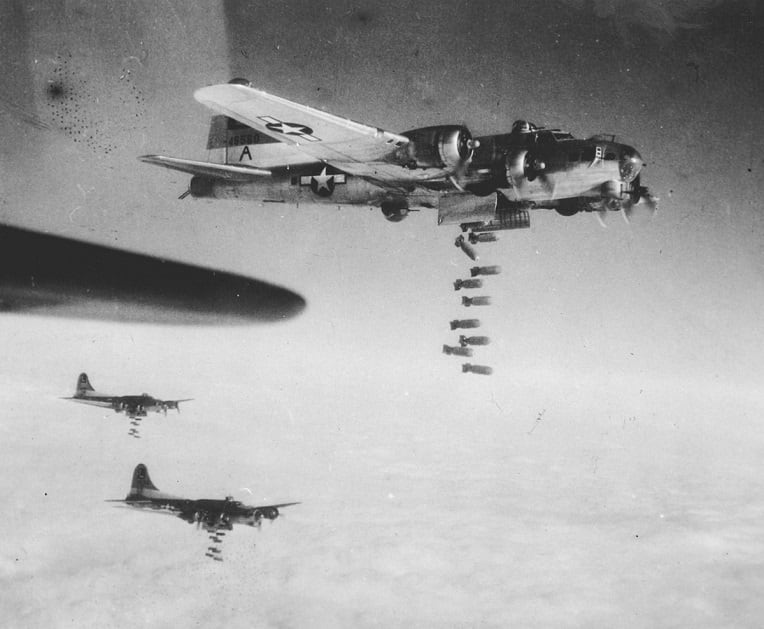
That is the line being drawn.
Which side are you on?
You misinterpreted my post. I was making that face at the Nazi phrase. I am in agreement with you. In fact, I've been here waiting for the majority of people here to finally come around to what we've known what the American people have been about for decades.
-
4
-


.thumb.png.abf89d81c1471e5ed610c9d17b2700cb.png)
Trump/MAGA has ruined sports
in Cloak Room
Beat me to it!