The Ace of Aces
Legacy Members
-
Joined
-
Last visited
Everything posted by The Ace of Aces
-
 Funny, I was coming to post the single sounds like a Zach Bryan song and not in a good way. It is super generic to me
 -
Deion would at least bring entertainment value to the floundering franchise
-
CBS Sports says it’s a $4m deal. They gave Ward $2.1m last year. https://www.cbssports.com/college-football/news/behind-miamis-multi-million-dollar-push-for-qb-carson-beck-who-lands-a-top-tier-nil-package-to-transfer/amp/
-
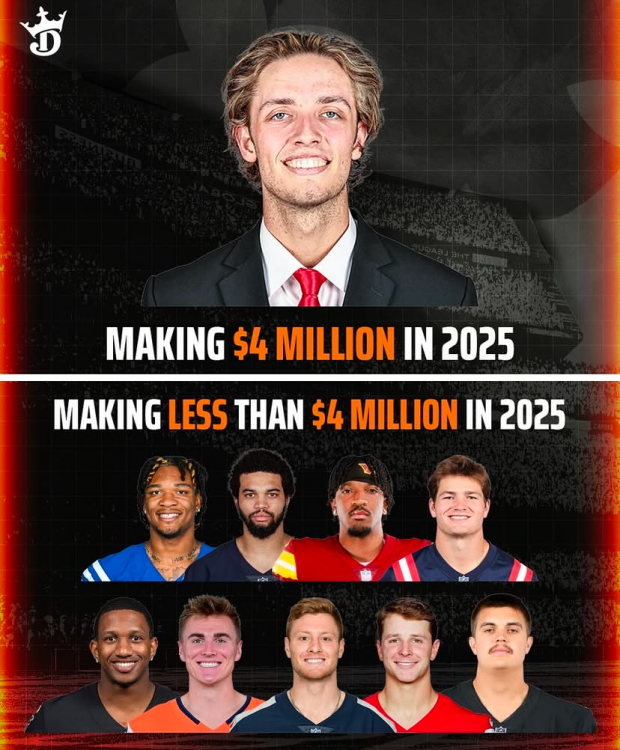
Beck’s $4 million NIL deal is a bigger salary than these guys and 4 times as much as Brock Purdy is making. I really do think Ewers might portal to ND.
-
If he goes anywhere it’ll be Notre Dame, from what I hear from the ND side.
-
Was in a boat that flipped over at night as a tornado crossed the lake while fishing. Was tied up to a bridge and it snapped the ropes. After the ordeal and we were able to wade to the bridge embankment I realized I had, indeed, shit myself. I have PTSD with any wind over 40 now and living here that is basically constant in winter and spring. No one should ever criticize anyone for their actions when facing an immediate catastrophe.
-
Hinted at him being late for meetings, not running out plays, losing trust. Mentioned Wingo started over him vs OSU as a clear message.
-
I find it interesting Vogel says Bond wouldn’t be welcomed back even if he doesn’t declare.
-
He fumbled a few snaps iirc. And was a split second from fumbled last night.
-
This. Arch will be fun but I think he’s going to have a fairly sizeable drop off next year regarding ball control.
-
Friend in Encino was woken up and told to leave immediate overnight. He fears the worst today.
-
The more he explains the call the worst the call is. Just a horrific time for the worst play all in the last who know show many decades of Texas football.
-
Hope he isn’t as turnover prone as I think.
-
-
-
-
-
-
-
-
-
-
-
-