

tx ind
Legacy Members
-
Joined
-
Last visited
Everything posted by tx ind
-
 He’ll sign it but the files will be heavily redacted and/or they’ll claim there’s an “open investigation” so they can’t release files.
 -
I believe GOP is the preferred nomenclature
-
Massie was saying live on CNN that in theory he could read the names live on the house floor if the DOJ doesn’t do their part.
-
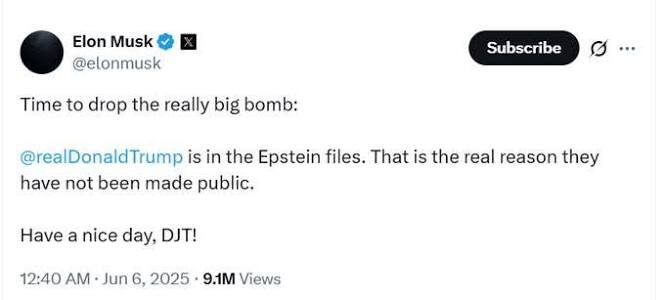
The big wild card is if the survivors go scorched earth and dish out names if Bondi and Patel do that.
-
wtf, VY is involved in this?
-
What time is the vote so we can see who the ones are that vote to not release?
-
100%, if it’s not encouraged then others won’t turn suit on Trump and MAGA, just have to pick off a few to get the snowball rolling.
-
University of Texas Head Football Coach Irving Meyers has a nice ring to it
-
We’ll get the first self pardon where Trump absolves himself from any legal issues from all past and future actions.
Even if they tried to scrub the files we all know they would fuck it up and they would miss shit.
Look at that tan suit
Follow up question for JD: How do all of these poor and undocumented minimum wage workers snap up all the houses whereas an employed college educated citizen can’t scrape together a few dollars to buy a house?
JD laughing at his own “jokes” throughout that clip is really something
The only reason I could see them bailing on Trump is when they decide he is toxic for them at the polls and they will face reelection trouble. Last Tuesday started to show that but maybe this pushes them over the edge. nah, who am I kidding, they’re a cult
As of this morning Mace says she’ll still sign the petition https://thehill.com/homenews/house/5602400-trump-boebert-mace-epstein-petition/amp/
As well as the embarrassment from the low turnouts
The Saints alternate white helmet and uniforms are great
 Didn’t he do the same thing with Iran and the nuclear sanctions? Killed Obamas deal that was working during his first term and then comes in office for his second term. Decides to drop a few bombs followed by nearly the same sanctions.
You’re making it too complicated, she/MAGA just want to own the libs, nothing else going on in their brains.
Didn’t he do the same thing with Iran and the nuclear sanctions? Killed Obamas deal that was working during his first term and then comes in office for his second term. Decides to drop a few bombs followed by nearly the same sanctions.
You’re making it too complicated, she/MAGA just want to own the libs, nothing else going on in their brains.









Football ...
Basketball ...
Baseball ...
Other Sports ...
Futbol ...
🤫995🤫 ...
Gambling ...
Movies & TV ...
Music ...
Hobbies ...
Lulz ...
Food & Travel
...
Daily Texan ...
Business & Markets ...
Cloak Room ...
Help ...
For Sale ...
Board Discussion ...
Advertise...
Tailgate Donations
Account
Search
Configure browser push notifications
Chrome (Android)
- Tap the lock icon next to the address bar.
- Tap Permissions → Notifications.
- Adjust your preference.
Chrome (Desktop)
- Click the padlock icon in the address bar.
- Select Site settings.
- Find Notifications and adjust your preference.
Safari (iOS 16.4+)
- Ensure the site is installed via Add to Home Screen.
- Open Settings App → Notifications.
- Find your app name and adjust your preference.
Safari (macOS)
- Go to Safari → Preferences.
- Click the Websites tab.
- Select Notifications in the sidebar.
- Find this website and adjust your preference.
Edge (Android)
- Tap the lock icon next to the address bar.
- Tap Permissions.
- Find Notifications and adjust your preference.
Edge (Desktop)
- Click the padlock icon in the address bar.
- Click Permissions for this site.
- Find Notifications and adjust your preference.
Firefox (Android)
- Go to Settings → Site permissions.
- Tap Notifications.
- Find this site in the list and adjust your preference.
Firefox (Desktop)
- Open Firefox Settings.
- Search for Notifications.
- Find this site in the list and adjust your preference.